
Table of Contents
The teach pendant serves as the bridge for human‑machine interaction, the core interactive terminal for robot and automation equipment control systems, and a critical tool for ensuring efficient and precise robot operation. Readers should note that the teach pendant discussed in this article refers specifically to the industrial robot teach pendant.
What Is A Teach Pendant?
A teach pendant (also referred to as a teach programmer or teach box) is an integral part of an industrial robot control system. It serves as the primary device through which operators interact with the robot, enabling parameter configuration, human‑machine interaction, and the registration and storage of mechanical motions or processing sequences.
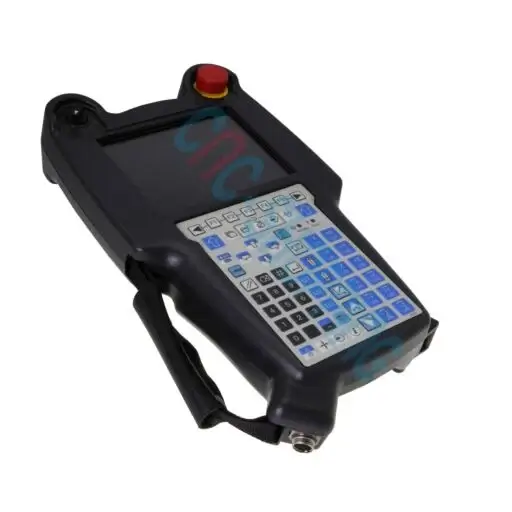
Its core function is to allow the operator to instruct the robot on actions, trajectories, speeds, and work sequences. With a teach pendant, users can perform all robot control tasks, including: starting the robot, writing programs, test‑running programs, executing production runs, and setting I/O interaction signals.
Recommended Related Reading from AI Robots Eidos
Industrial robots and teach pendants have a relationship of whole and part. The teach pendant is an indispensable human-machine interaction (HMI) terminal and programming/control tool within the industrial robot system, functioning as the interactive interface similar to a “remote control” for industrial robots. Together, they form a complete industrial robot system.
What truly determines production efficiency is the performance, load, accuracy, and cost of the industrial robot itself. If you are evaluating automation upgrade options, it would be beneficial to have a comprehensive understanding of industrial robots; please read this article: Industrial Robots: Strength, Speed, and Intelligence.
Types of Teach Pendants
By Appearance
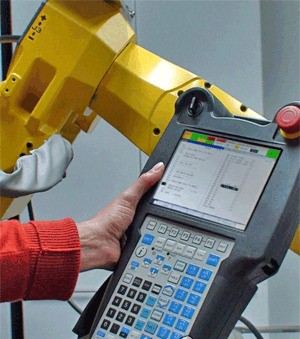
–Hand‑held Teach Pendant: A portable device consisting of a housing, internal circuit board, control panel (buttons, knobs, display, etc.), and connecting cables. It offers intuitive operation and is suitable for most industrial robots.
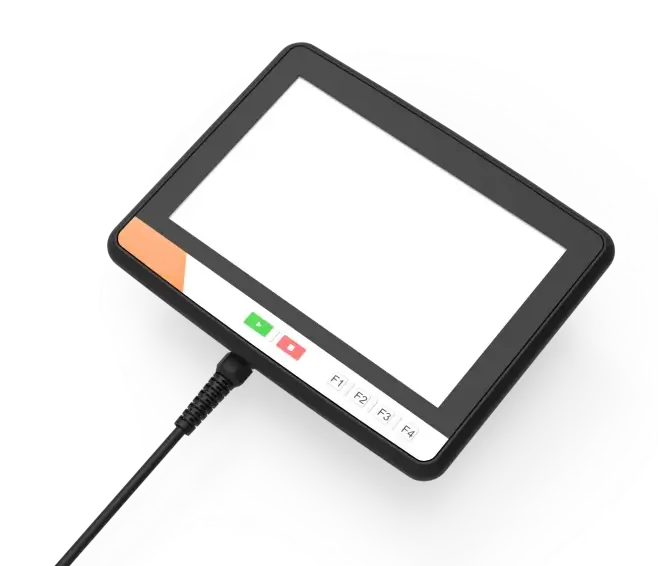
–Tablet Teach Pendant: Essentially an industrial tablet PC that connects to the robot via a dedicated app. It features a larger screen and a more intuitive user interface, making it common in collaborative robotics and scenarios that prioritise lightweight design and high‑quality interaction, such as configuring cobots.
–Web‑based Teach Pendant: No physical hardware; the operator connects a computer to the robot controller via an Ethernet cable and accesses the robot’s web interface through a browser. This type works for some 4‑axis and 6‑axis robots, offering flexible operation but relying on network availability.
By Communication and Connection
–Wired Teach Pendant: Physically linked to the robot controller or motion controller via communication cables (e.g., Ethernet, serial), providing both power and data transmission.
–Wireless Teach Pendant: Uses wireless technologies (e.g., Wi‑Fi, 5G) to exchange data with the robot controller, replacing cables and enabling wireless programming, parameter setting, motion control, status monitoring, and real‑time debugging.
| Dimension | Wired Teach Pendant | Wireless Teach Pendant |
| Flexibility | – Limited by cable length, the operating range is restricted. Prolonged friction can cause wear and tear or even short circuits, posing safety hazards. | – Uses wireless connectivity technologies (e.g., Bluetooth or Wi‑Fi), greatly extending the operating radius. Operators can move freely within a certain range, which is convenient for working in confined spaces. |
| Interference Immunity | – Signal transmission via cable provides strong immunity to interference, ensuring more stable and reliable signal transmission. | – May be susceptible to external wireless interference, which could cause unstable signal transmission and affect normal pendant operation. |
| Signal Transmission Speed | – Signal latency is low, enabling faster command delivery to robots or automation equipment. This makes wired pendants suitable for applications that demand high precision and real‑time response. | – May experience some transmission latency, which can impact the operational precision of robots or automation equipment to a certain degree. |
| Cost and Deployment Efficiency | – One pendant typically controls only one robot or device, resulting in a large number of pendants on the production line, higher procurement costs, and lower overall debugging efficiency. | – One pendant can control multiple robots or devices. Procurement and maintenance costs are relatively lower than wired solutions, while debugging and deployment efficiency are significantly higher. |
Functions of A Teach Pendant
–Programming and Path Teaching: Supports point recording and trajectory programming. Operators can manually guide the robot to record key points and set motion modes (joint, linear, circular). Parameters such as point coordinates, speed, and acceleration can be edited. Some models support programming languages like RAPID and KRL, allowing logic statements (loops, conditionals) and optimisation of path smoothness and tolerances for improved motion accuracy.
–Operation Control and Mode Switching: With mode selectors and function keys (start, stop, etc.), operators can run programs step‑by‑step for debugging or launch automatic execution. Robot speed can be adjusted to suit different tasks.
–Status Monitoring and Fault Diagnosis: The status bar shows real‑time information on robot state, coordinate systems, motor power, etc. I/O buttons bring up monitoring interfaces for all signals. Logs display alarm records at various levels, helping quickly pinpoint faults. An emergency stop button immediately halts robot motion in critical situations.
–Parameter Configuration and File Management: System parameters (I/O settings, communication protocols, etc.) can be configured, and coordinate systems (world, tool, user, etc.) can be switched. The pendant supports program creation, saving, backup, and version rollback. Users can customise workspace layouts and shortcuts, and create macro scripts to simplify repetitive operations.
–Expansion and Interaction: Some models have USB, Ethernet, and other ports for data exchange with external devices and remote control. Others feature high‑definition touchscreens with user‑friendly interfaces and support hierarchical user management with permissions to protect programs and device security.
Components of A Teach Pendant
–Touchscreen: A touch‑sensitive display that receives input from fingers or a stylus. It replaces mechanical button panels and provides vivid visual feedback through the LCD screen.
–Emergency Stop Switch: Also called an emergency stop button. Pressing it instantly triggers protective measures in an emergency.
–Manual Control Joystick: Used for manual robot operation. Its deflection amplitude is proportional to the robot’s motion speed, similar to an accelerator pedal.
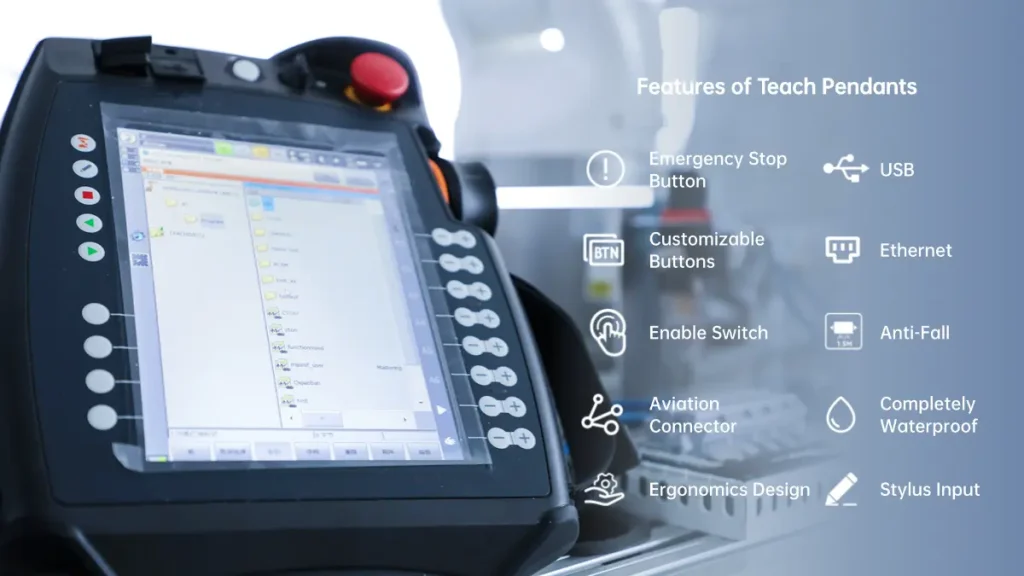
–USB Port for Data Backup: A standard interface for connecting external devices, commonly used for data backup.
–Enable Switch: A safety feature that ensures operator protection. Only when pressed and held in the motor‑on state can manual operation and program debugging proceed.
–Reset Button: A momentary push‑button that reboots the pendant system, similar to a computer restart button.
–Touchscreen Stylus: A small pen‑shaped tool for precise input on the touchscreen, used to select files or draw.
–Connecting Cable: Typically connects the pendant to the robot controller.
Operation Modes
The pendant offers three modes – Teach, Run, and Remote – switchable via a button.
–Teach Mode: For process programming and real‑time control.
Process programming: The user creates a process file, writes programs and logic, and then gently presses the enable switch to debug the program.
Real‑time control: With the enable switch held, the user directly controls the robot through the panel buttons.
–Run Mode: All servo drives are enabled, and the debugged process file is loaded and executed at full speed. The operator monitors the robot’s status via the pendant screen, which acts as a supervisory interface.
–Remote Mode: The user connects a computer to the pendant via Ethernet for online debugging. Parameters and process development can be done on the computer, and the program downloaded to the pendant. Alternatively, the process file can be copied to a USB drive and loaded from the pendant.
Advantages of A Teach Pendant
–Safety: The enable switch ensures operator protection. When lightly pressed, the servo drives are enabled and the robot can move; when released, the drives are disabled and the robot stops, greatly enhancing personnel and equipment safety.
–Monitoring: In Run mode, the pendant automatically executes the program. The operator no longer needs to intervene, and the display provides feedback on robot operation, detecting anomalies or errors, and even predicting potential faults. The pendant serves as a window into the robot’s actions and overall program execution.
–Rich Integrated Components: The pendant integrates various components, not only for robot control but also for coordinating other devices in the system. Operators can load programs and write subroutines that synchronise robot motion with auxiliary equipment. Many factories store dedicated subroutines (e.g., for part unloading) directly on the pendant.
–Real‑time Adjustment: When the robot drifts, suffers alignment issues, or when simulation does not perfectly match reality, the pendant can compensate for accuracy errors, ensuring precise operation.
Challenges Facing Teach Pendants
–Precision: Positioning accuracy heavily depends on the operator’s visual estimation and experience. For complex paths or high‑precision tasks, satisfactory results are difficult to achieve, and intricate trajectory planning is challenging.
–Standardisation: Most pendants are developed independently by each brand, leading to incompatible standards. For example, pendants from ABB and FANUC cannot be used interchangeably, requiring operators to invest significant time in learning different systems, increasing training costs.
–Efficiency: Teaching requires manual control of each joint and point‑by‑point recording, which is tedious and time‑consuming. Overall programming efficiency is low, especially unsuitable for complex paths.
Robot Teach Pendant Market
Market Size
Market size data is compiled from sources including Juyi Information Consulting, Global Info Research, QYResearch, and others, for reference purposes only.
Overall Market
2024: Global market approximately USD 415 million.
2030: Projected to reach USD 540 million, with a CAGR of about 5.1% from 2024 to 2030.
Segmented Market Size
Tablet Teach Pendants: ~USD 232 million in 2024, projected to USD 347 million by 2031, CAGR ~6.0% (2025–2031).
Mobile Teach Pendants: ~USD 423 million in 2024, projected to USD 660 million by 2031, CAGR ~6.6%.
Collaborative Robot Teach Pendants: ~USD 61 million in 2024, projected to USD 92 million by 2031, CAGR ~6.1%.
Competitive Landscape
International giants (mostly major industrial robot manufacturers) dominate the market with stable, high‑performance products widely used in automotive, 3C electronics, material handling, and other sectors.
ABB: Offers pendants with comprehensive Chinese interface and touchscreen operation, widely applied across various industrial scenarios.
FANUC: The iPendant Touch features a robust impact‑resistant design and integrates powerful programming and simulation tools.
YASKAWA: The Smart Pendant emphasises lightweight and portability, suitable for clean environments such as semiconductor and food packaging.
Future Development Directions
–Intelligence: Teach pendants will deeply integrate AI large‑model technologies, enabling breakthroughs in natural‑language programming, autonomous learning, and anomaly detection. AI algorithms will enhance path planning by analysing historical data and automatically generating optimal trajectories, reducing manual debugging. For anomaly detection, integrated vision and force sensors will allow real‑time monitoring of joint torque deviations, trajectory errors, etc., with automatic alerts or parameter adjustments. This will upgrade pendants from tools to intelligent decision‑making terminals.
–Modularisation: Modular design will become a core competitive advantage. Hardware modules (communication, storage, display, sensors) will be independent and pluggable, allowing users to flexibly configure pendants based on actual production needs – achieving customised on‑demand flexible manufacturing and lowering replacement costs. Specifically, a hardware‑modular plus software‑configurable architecture, combined with different software configurations, will enable quick adaptation to diverse scenarios (palletising, assembly, etc.), balancing mass‑production efficiency with individual requirements.
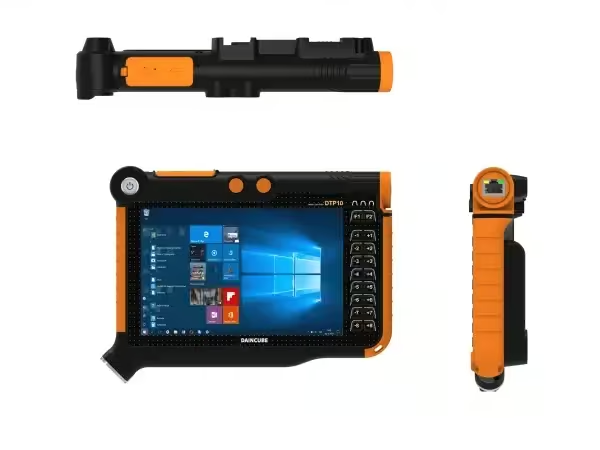
–Wireless and Collaborative Capabilities: Wireless designs eliminate cable constraints, enabling real‑time transmission of device parameters to the cloud and remote debugging across regions, reducing deployment costs. Advances in communication will also push pendants towards one‑to‑many remote control. With EtherCAT bus achieving 1‑ms cycle times, a single pendant can synchronise multiple robots, supporting collaborative multi‑device operations. This trend fosters ecosystem alliances among component suppliers (reducers, servo systems) and pendant manufacturers, promoting localisation of complete solutions.
Insight from AI Robots Eidos about The Teach Pendant
—The future teach pendant will no longer be a physical device but a “software mirror” of all the functions of robots (programming, monitoring, debugging, diagnosing) on any intelligent terminal. Engineers will be able to pull up a complete teach pendant interface on tablets, computers, or even smartphones, while the physical teach pendant will only exist as a backup emergency means in industrial settings.
—In the future, robots will autonomously understand human motion intentions through vision and sensors, without needing manual point-by-point recording or programming. The teach pendant will no longer be a “teaching tool” but rather a “confirmation and verification tool”—the operator will only need to perform an action once, and the robot will automatically generate the program through imitation learning, with the teach pendant used solely to confirm parameters and boundary conditions.
—In the future, the teach pendant will archive not just program files but also a repository of process experiences—every instance of manual intervention, parameter adjustment, and fault troubleshooting will be recorded and used to train local AI models. For instance, when a new employee inputs “welding thin sheets” into the teach pendant, the system will automatically recommend the best previous parameter combinations. The teach pendant will evolve from an “execution terminal” into a “living carrier of enterprise process knowledge”.
Image Credits: Cnc-shopping & Rbtx & Vantrontech & Motioncontrolsrobotics & Daincube